Back to Basics:
Redux
(with GIF's!)
Topics:
- Motivation
- Functional Basics
- What is redux
- Quick Demo
- Reasons to use it with React
- Using it with React
- Gotchas
- Q&A
Motivation
- Most people that start using React quickly face one of the biggest pain points of the library
- Some look around for solutions, and find Redux
- Unfortunately, Redux is not an easy concept to grasp
Fear not! We are here to help!
Functional Programming(*)
* actually, just a thing or two
Pure functions
// This is pure
function(value) {
	let result = 0
	// (does something with value)
	return result
}
// This is not pure
let outsideVar = 12
function(value) {
	// (does something with value)
	let result = value + outsideVar
	return result
}
Pure (all values come from inside the function) Impure(uses a value from outside the function)
Immutability
let myObj = {name: 'Leo', age: '42'};
// AVOID: changing values inside an object:
myObj.age = 41;
// PREFER: recreate the object using the values:
myObj = {...myObj, age: 41}
// Or, non ES6 Style:
myObj = Object.assign({}, myObj, {age: 41})
Avoid changing the values inside your objects Prefer to recreate the object copying the values instead
So, what is Redux?
From the website:
Redux is a predictable state container for JavaScript apps.
or, in image:
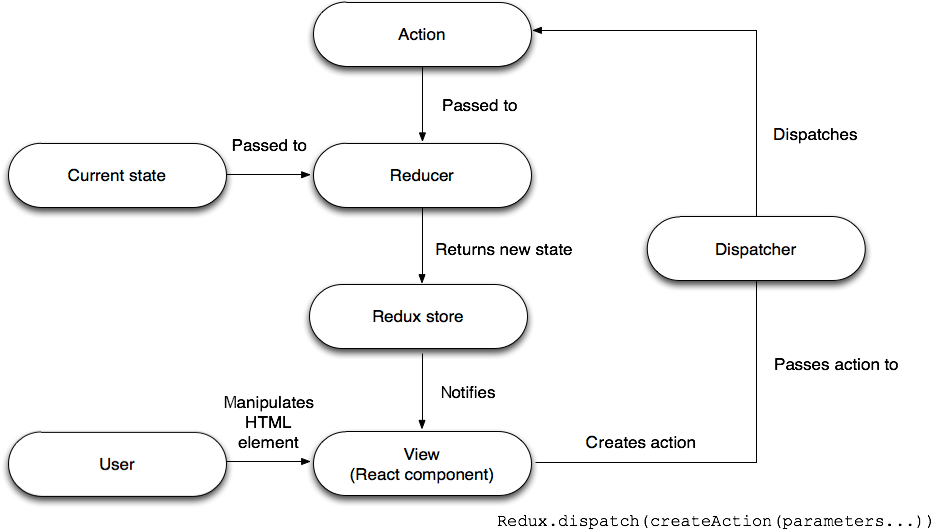
wait... what?
Little Demo
(without React)
HTML code
<div class='container'>
	<h1>
		<span id='counter'>0</span>
	</h1>
	<div class='buttons'>
		<button id='dec'>-</button>
		<button id='inc'>+</button>
	</div>
</div>
JS (vanilla) code
let counter = 0;
const counterDisplay = document.getElementById('counter');
const decButton = document.getElementById('dec');
const incButton = document.getElementById('inc');
decButton.addEventListener('click', () => {
	counterDisplay.innerText = --counter;
})
incButton.addEventListener('click', () => {
	counterDisplay.innerText = ++counter;
})
State Element Selectors Event Listeners (and state modifiers)
Issues
- The app state is a global variable
- Event listener is also responsible for mutating the state (separation of concerns)
Introducing... BAD-Dux!

Reducer
let defaultState = { counter: 0 }
let reducer = (state = defaultState, action) => {
	switch (action.type) {
		case 'INC':
			return { counter: state.counter + 1 };
		case 'DEC':
			return { counter: state.counter - 1 };
		default:
			return state
	}
}
Reducer: pure function that receives the current state and a action, and based on the action, returns a new state.
The 'Bad-Dux' object:
let store = {
	state: null,
	listeners: [],
	getState() { return this.state },
	subscribe(callback) {
		this.listeners = [...this.listeners, callback]
	}
	dispatch(action) {
		let newstate = this.reducer(this.state, action)
		if (newstate !== this.state) {
			this.state = newstate
			this.listeners.forEach(listener => listener())
		}
	},
}
Creating the store and setting some default values. Just a getter method. Function that adds a callback to the list of listeners. Dispatcher function
dispatch(action) {
	let newState = this.reducer(this.state, action)
	if (newState !== this.state) {
		this.state = newState
		this.listeners.forEach(listener => listener())
	}
}
Calls the reducer with the current state, and the requested action If the state has changed:
- Changes the state
- Executes every function inside the listeners array
let defaultState = { counter: 0 }
let reducer = (state = defaultState, action) => {
	switch (action.type) {
		case 'INC':
			return { counter: state.counter + 1 };
		case 'DEC':
			return { counter: state.counter - 1 };
		default:
			return state
	}
}
store.reducer = reducer
let changeCounter = () => {
	document.getElementById('counter').innerText = store.getState().counter
}
store.subscribe(changeCounter)
document.getElementById('dec')
	.addEventListener('click', () => store.dispatch({type: 'DEC'}));
document.getElementById('inc')
	.addEventListener('click', () => store.dispatch({type: 'INC'}));
Store default state Creating reducer Callback function (observer) Subscribing Event Listeners (that dispatch actions)
Advantages
- Separation of concerns:
- Events only dispatch actions
- Reducers only generate a new state (based on the old)
- The store is single responsible for changing the state
- Reusable: create a new reducer and observer and you are ready to go!
Now back to Redux!
let store = {
		state: null,
		listeners: [],
		getState() { return this.state },
		subscribe(callback) {
			this.listeners = [...this.listeners, callback]
		}
		dispatch(action) {
			let newstate = this.reducer(this.state, action)
			if (newstate !== this.state) {
				this.state = newstate
				this.listeners.forEach(listener => listener())
			}
		},
	}
	store.reducer = reducer
Just change this...
<script src="redux.min.js">
let store = window.Redux.createStore(reducer)For this!
Why use it with React?
- React is (possibly) the main front-end library at the moment.
- Makes it easy to split your interface into components
but also...
- Makes it hard to control the data flow in your application
Many solutions exists:
- Passing props
- Using Context (but please, don't!)
- Using a state management library (like Redux!)
Using Redux with React
Disclaimer:
This is just a (tiny!) introduction on how to implement Redux in a small app.
In a real-world application, there are much more to do (mapDispatchToProps, createActions functions, compose reducers, middleware, memoise, ...)
Install redux and react-redux
yarn add redux react-reduxCreate your reducer (as seen before)...
let defaultState = { counter: 0 }
let reducer = (state = defaultState, action) => {
	switch (action.type) {
		case 'ADD_TODO':
			return {
				...state,
				todos: [...todos, action.newTodo]
			}
		case 'REMOVE_TODO':
			return {
				...state,
				todos: todos.filter(todo => todo !== action.removedTodo)
			};
		default:
			return state
	}
}
In your index.js
import React from 'react'
import { render } from 'react-dom'
import { Provider } from 'react-redux'
import { createStore } from 'redux'
import reducer from './reducers'
import App from './components/App'
let store = createStore(reducer)
render(
  <Provider store={store}>
    <App />
  </Provider>,
  document.getElementById('root')
)
Create your store (also as seen before) Import the component Provider from react-redux Wrap your App inside the Provider
In your component
import React, {Component} from 'react'
import {connect} from 'react-redux'
(...)
class MyComponent extends Component {
	(...)
	handleClickIncButton = (ev) => {
		this.dispatch({type: 'ADD_TODO', newTodo: this.state.newTodo})
	}
	(...)
	render() {
		const {todos} = this.props
		return (...)
	}
}
const mapStateToProps = (state) => ({todos: state.todos})
export default connect(MapStateToProps)(MyComponent)
First, import 'connect' from react-redux Then, create a mapping between your store and the props that will be passed Finally, connect this mapping to your component
In your component
import React, {Component} from 'react'
import {connect} from 'react-redux'
(...)
class MyComponent extends Component {
	(...)
	handleAddTodoButton = (ev) => {
		this.dispatch({type: 'ADD_TODO', value: this.state.newTodo})
	}
	(...)
	render() {
		const {todos} = this.props
		return (...)
	}
}
const mapStateToProps = (state) => ({todos: state.todos})
export default connect(MapStateToProps)(MyComponent)
You can access the data from your store as a 'prop' And also can dispatch actions using 'this.props.dispatch'
Gotchas
- Remember: *do not* mutate the state inside the reducer (create a new state and return it instead)
- Reducers should always be pure functions
- The actions are always objects, that describe what to do and (if necessary) what data is to be manipulated.
More information
- Redux: redux.js.org
- This Presentation: redux.weblers.net
Thank you
Leonardo Rota-Rossi
leo@weblers.net